Most SEO audit tools either hide the useful stuff behind a paywall or give you a score with zero context. You get a "67" and no idea what to do about it.
We built a free SEO audit tool that runs 35 checks on any URL — meta tags, heading structure, image optimization, link health, robots.txt, sitemap, performance, and security headers — and tells you exactly what passed, what failed, and what to fix.
One URL. One scan. No account required.
This post walks you through how to use it, what every check means, and what to do with the results.
Step 1: Run the Audit
Go to fanxielab.com/tools/site-audit and paste your URL. That's it.
The tool runs eight sequential checks against your page in real time — you'll see each one animate as it completes:
- Checking meta tags
- Analyzing headings
- Scanning images
- Checking links
- Reading robots.txt
- Locating sitemap
- Measuring performance
- Checking security headers
Takes a few seconds. When it's done, you get a summary with your overall score and top three issues.
Step 2: Understand Your Score
The summary shows two things: a numeric score from 0 to 100 in a circular badge, and letter grades for each of the eight categories.
The grading scale:
- A / B (green) — You're in good shape. Minor improvements possible but nothing urgent.
- C (yellow) — Noticeable issues. Worth fixing, especially if you care about rankings.
- D / F (red) — Real problems. These are actively hurting your search visibility or user experience.
Individual checks within each category show one of three states: passed, failed, or warning. Failed checks are what's dragging your grade down.
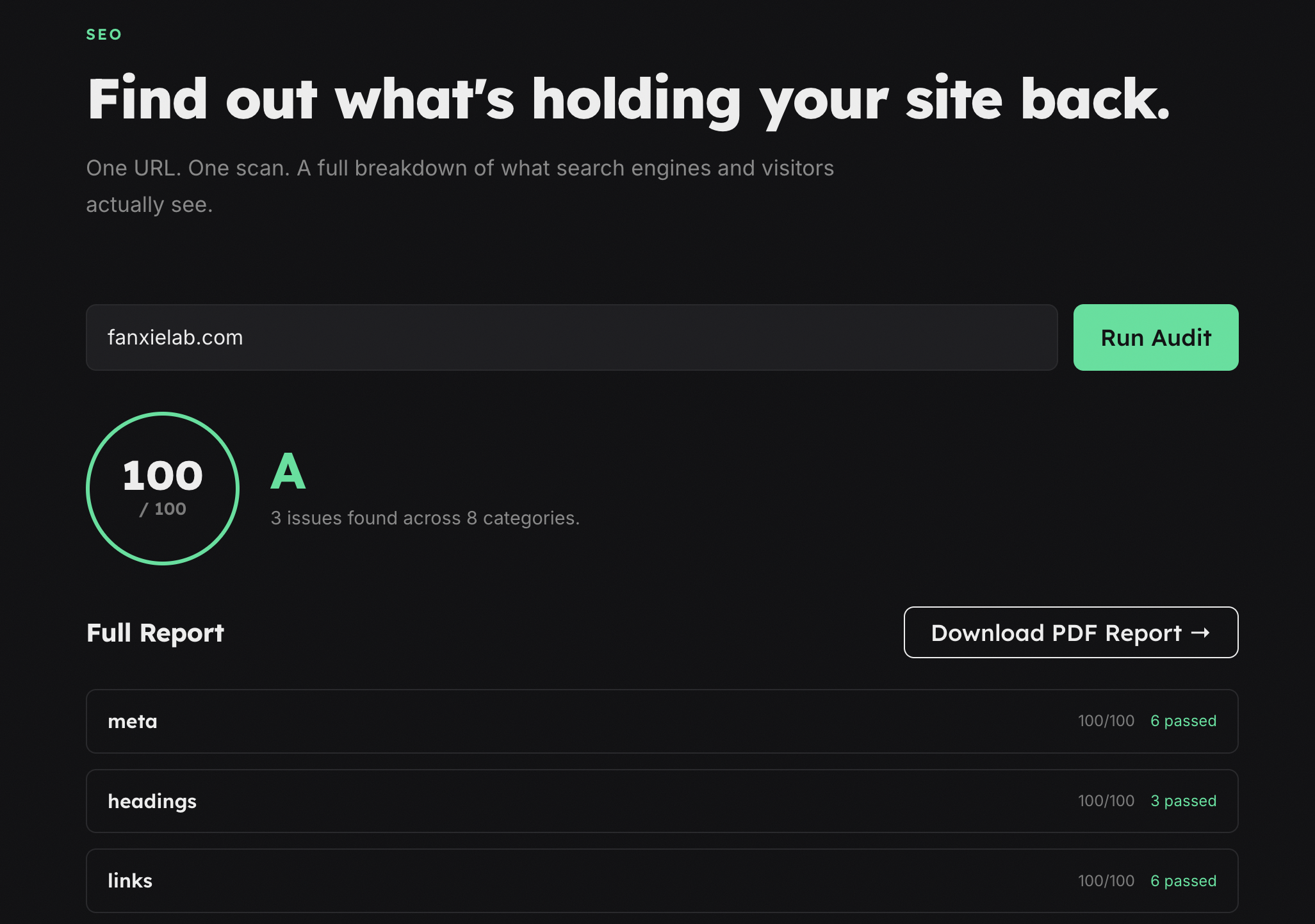
Step 3: Walk Through Your Results
The full report breaks down into eight sections. Here's what each one checks, what the results mean, and what to fix if something fails.
1. Meta Tags
This is the foundation. Meta tags tell search engines what your page is about and control how it appears in search results and social shares.
What gets checked (7 checks):
- Page title — present and reasonable length
- Meta description — present and within character limits
- Open Graph title, description, and image — controls how the page looks on social platforms
- Canonical URL — tells search engines which version of the page is authoritative
If something fails: A missing title tag means Google is guessing your page title. A missing OG image means your links look broken on LinkedIn and Twitter/X. These are quick fixes with outsized impact — most take under five minutes in your HTML head.
2. Headings
Heading structure tells search engines (and screen readers) how your content is organized. It matters more than most people think.
What gets checked (3 checks):
- Single H1 tag — every page needs exactly one
- H2 subheadings — present and used for content structure
- Heading hierarchy — levels follow a logical order, no skipping from H2 to H4
If something fails: The most common issue is multiple H1 tags — often caused by a CMS or template that wraps the logo and the page title in H1s. The fix is straightforward: one H1 per page, and headings that follow a logical order (H1 > H2 > H3, no gaps).
3. Images
Unoptimized images are the most common performance problem we see on the sites we audit. They're also one of the easiest to fix.
What gets checked (3 checks):
- Alt text — present on every image (accessibility and SEO)
- Explicit dimensions — width and height attributes set (prevents layout shift)
- Lazy loading — images below the fold use
loading="lazy"
If something fails: Missing alt text hurts your image search rankings and makes your site inaccessible to screen readers. Missing dimensions cause Cumulative Layout Shift — that annoying jump when images load and push content around. Add width, height, and alt to every <img> tag. It's tedious but mechanical.
4. Links
Broken and misconfigured links erode trust — both with search engines and the people clicking them.
What gets checked (4 checks):
- Empty links — anchor tags with no
hrefor emptyhref javascript:links — bad practice, inaccessible, and ignored by crawlers- Internal links — a rough measure of site interconnection
- External links use
rel="noopener"— security best practice for outbound links
If something fails: Empty links and javascript: links are usually leftover from interactive elements that should be buttons, not anchors. Missing rel="noopener" on external links is a security gap — the linked page can access your window.opener object. Easy fix: add it to every external anchor tag.
5. Robots.txt
Your robots.txt file tells search engine crawlers what they can and can't access. Getting it wrong can quietly block your entire site from being indexed.
What gets checked (3 checks):
- Robots.txt present — file exists at
/robots.txt - Sitemap directive — robots.txt points crawlers to your sitemap
- User-agent rules — confirms you're not accidentally blocking important crawlers
If something fails: If robots.txt is missing entirely, crawlers still index your site — but you lose control over what they access. If it exists but has misconfigured rules, you might be blocking Googlebot from your most important pages without knowing it. Check the Disallow rules carefully.
6. Sitemap
A sitemap helps search engines discover and index your pages efficiently. Especially important for larger sites or sites with pages that aren't well-linked internally.
What gets checked (1 check):
- Sitemap present — accessible at a standard location or referenced in robots.txt
If something fails: Most CMS platforms generate a sitemap automatically. If yours is missing, check your CMS settings or generate one with a plugin. Then reference it in your robots.txt with a Sitemap: directive so crawlers find it immediately.
7. Performance
Page speed affects rankings directly — Google uses Core Web Vitals as a ranking signal — and indirectly through bounce rates. A slow page loses visitors before they read a word.
What gets checked (5 checks):
- Inline CSS amount — excessive inline styles slow rendering
- Script count — too many scripts block page load
- Viewport meta tag — required for mobile rendering
- Compression — gzip or Brotli enabled
- Render-blocking scripts — scripts that delay first paint
If something fails: The most impactful fix is usually enabling compression — it can cut transfer size by 70% or more. After that, look at render-blocking resources. Scripts in the <head> without async or defer attributes force the browser to stop everything and execute them before rendering anything. Move them, defer them, or remove them.
8. Security Headers
Security headers don't directly affect SEO rankings, but they protect your visitors and signal that your site is professionally maintained. Google has stated that HTTPS is a ranking factor, and security headers are part of that trust chain.
What gets checked (9 checks):
- Server technology exposed — checks if your server header leaks version info
- Content-Security-Policy (CSP) — prevents XSS and injection attacks
- Strict-Transport-Security (HSTS) — forces HTTPS connections
- X-Frame-Options — prevents clickjacking
- X-Content-Type-Options — prevents MIME-type sniffing
- Referrer-Policy — controls what URL info gets shared
- Permissions-Policy — restricts browser feature access
- Cache-Control — proper caching directives
- Server info leak — confirms version details aren't exposed in response headers
If something fails: Most sites are missing at least three or four of these. The good news: adding security headers is usually a one-time config change in your web server or CDN. The bad news: getting CSP right without breaking your site takes some care. Start with the simpler headers (X-Content-Type-Options, X-Frame-Options) and work your way up.
Getting the Full Report
The initial scan shows your overall score and the top three issues — enough to know where you stand.
For the complete picture — every check in every category, with explanations and pass/fail/warning breakdowns — enter your email when prompted. You'll also get the option to download a PDF of the full report.
No account, no password, no recurring emails. Just the report.
What to Do With Your Results
Start with the red. If any category scored D or F, that's where your effort has the highest return. Within each category, failed checks appear first — work through them top to bottom.
A rough priority order:
- Meta tags — fastest fixes, biggest visibility impact
- Robots and Sitemap — misconfiguration here can block everything else from mattering
- Headings and Images — structural issues that affect both SEO and accessibility
- Links — clean up broken and empty links
- Performance — enable compression, defer scripts, reduce page weight
- Security headers — add them one at a time, test after each
Most of the fixes above don't require a developer. A few — CSP configuration, render-blocking resource optimization, server-level compression — might.
Your SEO Checklist
Here's the short version. Run the audit, then check off what you've fixed:
- Every page has a unique title tag and meta description
- Open Graph tags are set (title, description, image)
- Canonical URL is defined
- One H1 per page, headings in sequential order
- Every image has alt text, width, height, and lazy loading where appropriate
- No empty links or
javascript:hrefs - External links use
rel="noopener" - robots.txt exists and doesn't block important pages
- Sitemap is present and referenced in robots.txt
- Compression is enabled (gzip or Brotli)
- No render-blocking scripts
- Security headers are configured — at minimum HSTS, X-Content-Type-Options, and X-Frame-Options
That covers the fundamentals. If everything above passes, you're ahead of most sites on the internet.
Run It Now
The tool is at fanxielab.com/tools/site-audit. Paste your URL, see what comes back.
If the results surface problems you're not sure how to fix — that's what we do. We build and optimize sites for a living, and every engagement starts with exactly this kind of audit.
Need help fixing what you find? Let's talk →
We're Fanxie Lab, a small studio in Colombia building sites, apps, and tools. We've been at this since 2016.